cpu-logind in /var/tmp Is XMRig: How a MonitorVPS Alert Caught a Cryptominer
If you found a process called cpu-logind running from /var/tmp with the command line "/var/tmp/cpu-logind -c config.json", it is an XMRig Monero cryptominer. Here is how MonitorVPS suspicious-path and resource anomaly detection caught it on a customer's server.
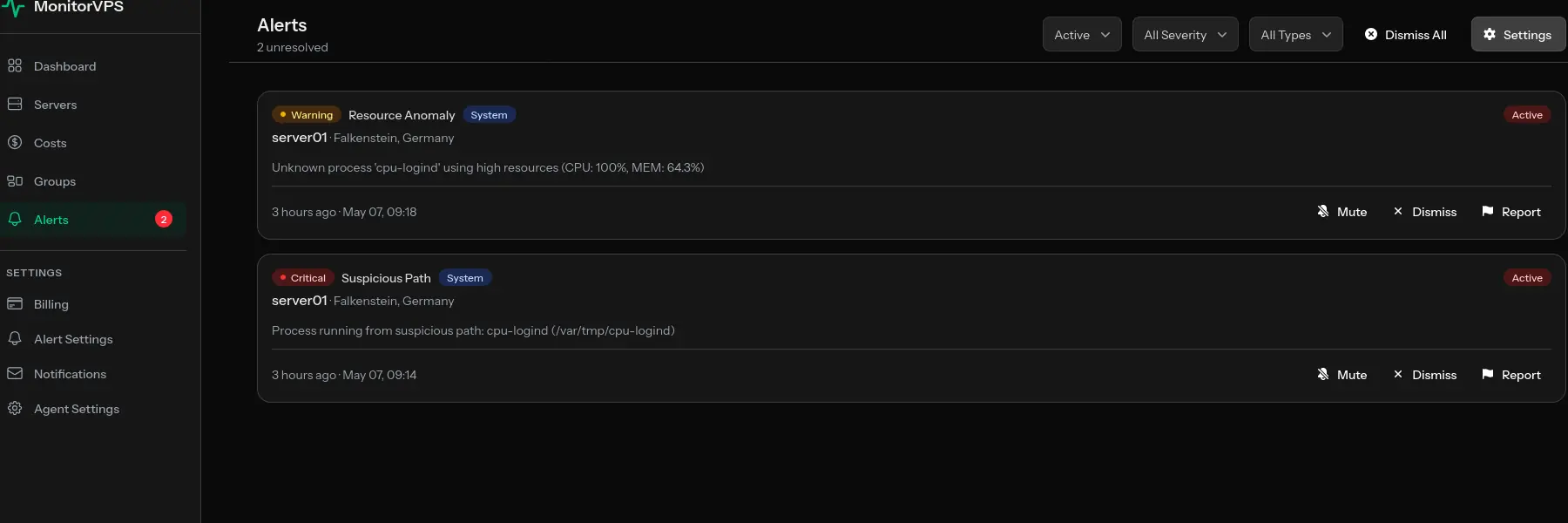
A process named cpu-logind running from /var/tmp/cpu-logind with the command line /var/tmp/cpu-logind -c config.json is an XMRig Monero cryptominer, not a legitimate systemd component. A MonitorVPS customer recently caught one on server01 (Hetzner, Falkenstein, Germany) thanks to two automated emails that fired moments apart: a critical suspicious-path anomaly and a warning-level resource anomaly.
Alert 1: Suspicious Path (Critical)
The first email arrived at 09:14 UTC. MonitorVPS's default suspicious_path rule had spotted a process running from /var/tmp, a location no legitimate Linux daemon should ever live in.
Server Alert
- Server
server01- Provider
- Hetzner
- Location
- Falkenstein, Germany
- Alert Type
- Suspicious Path
- Severity
- Critical
- Message
- Process running from suspicious path:
cpu-logind(/var/tmp/cpu-logind) - Time
- 2026-05-07 09:14:32 UTC
The default suspicious-path rule covers /tmp, /var/tmp, /dev/shm, and user home directories. Real services live in /usr/bin, /usr/sbin, /usr/local/bin, or under systemd unit paths. Anything launched from a world-writable temp directory is, by default, treated as critical.
Alert 2: Resource Anomaly (Warning)
Four minutes later, at 09:18 UTC, the same unknown process triggered MonitorVPS's resource anomaly rule by pinning a CPU core at 100%. CPU miners are easy targets for monitoring because sustained core saturation is exactly what they do.
Server Alert
- Server
server01- Provider
- Hetzner
- Location
- Falkenstein, Germany
- Alert Type
- Resource Anomaly
- Severity
- Warning
- Message
- Unknown process '
cpu-logind' using high resources (CPU: 100%, MEM: 64.3%) - Time
- 2026-05-07 09:18:47 UTC
Process Details
- Process
cpu-logind- User
root- PID
1234- CPU Usage
- 100.0%
- Memory Usage
- 64.3%
- Command
/var/tmp/cpu-logind -c config.json
Confirming It Is XMRig
The customer forwarded the alerts to MonitorVPS support, and we confirmed the binary was XMRig. The fingerprint is unmistakable:
- The
-c config.jsonflag is XMRig's standard way of pointing the miner at a JSON config file containing pool URL, wallet address, and worker name. - The name
cpu-logindis a deliberate decoy. It mimics the realsystemd-loginddaemon to look harmless inpsortop. There is nocpu-logindbinary in any Linux distribution, and no legitimate package ships under that name. - Together, the path (
/var/tmp), the binary name, and the-c config.jsoninvocation are a fingerprint of XMRig running with an attacker-supplied mining config.
Why MonitorVPS Caught It
- The default
suspicious_pathrule covers/tmp,/var/tmp,/dev/shm, and user home directories. Places no legitimate daemon should run from. - The default resource anomaly rule fires when an unknown process sustains high CPU.
- Both alerts arrived by email within minutes of the miner starting, well before it could mine anything meaningful.
If You Found cpu-logind on Your Server
If your search for /var/tmp/cpu-logind -c config.json brought you here, you are looking at a confirmed XMRig compromise. Treat the host as breached: isolate it from the network, capture forensics if you need them, and rebuild from a known-clean state. The customer in this case is doing exactly that, provisioning a fresh server while investigating how the attacker got in originally.
Frequently Asked Questions
Is cpu-logind a virus?
Yes. A binary named cpu-logind running from /var/tmp is the XMRig Monero cryptominer disguised to look like a systemd component. There is no legitimate cpu-logind binary in any Linux distribution.
What is /var/tmp/cpu-logind -c config.json?
It is the standard XMRig invocation. /var/tmp/cpu-logind is the renamed XMRig binary, and -c config.json points it at a JSON file containing the attacker's mining pool URL, wallet address, and worker name.
How did cpu-logind get on my server?
Most cpu-logind infections arrive through a remote code execution vulnerability, weak SSH credentials, or an exposed admin interface. The miner itself is just the payload, so identifying the entry vector requires reviewing logs, recently changed binaries, and authentication history.
Why is cpu-logind running as root?
The initial compromise gave the attacker root-level code execution. Running the miner as root lets it persist in cron jobs or systemd units that only root can edit, and lets it use 100% of available CPU instead of being capped by user limits.
Can I just delete /var/tmp/cpu-logind to fix it?
No. Killing the process and deleting the binary stops the immediate mining, but does not address whatever attacker access enabled the install. Treat the host as compromised, isolate it from the network, and rebuild from a known-clean state.